Every supplier onboards the same way. It shouldn't take fifteen emails.
Clover turns onboarding into one guided task for the supplier and one review for you. Documents are checked as they arrive, approvals carry their reasons, and the supplier record lands in your ERP.


 Then Jordan reviews
Suppliers managed in Clover include



















Today
Where onboarding breaks down
-
Every new supplier is 15 emails and a month of follow-up
By the time the supplier is set up, the urgency has passed. The process works. It just doesn't scale.
-
Documents and details arrive incomplete, in the wrong format, or not at all
There's no validation when suppliers submit documents or information, so your team becomes the quality check.
-
When the person who onboarded a supplier leaves, the record goes with them
Why a supplier was approved, and on what conditions, isn't in a system. It's in someone's head.
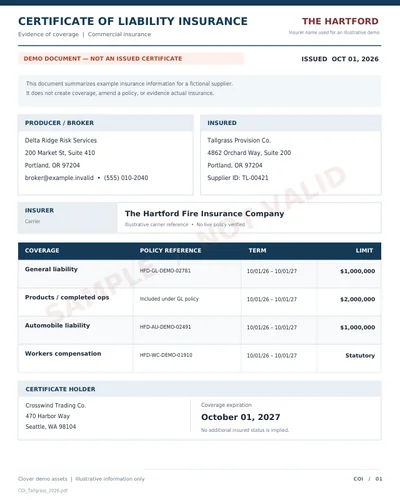 Expired
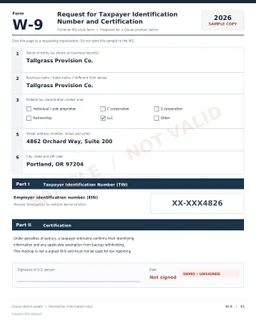 Wrong form
In Clover
One workflow, from invitation to supplier record
Set the requirements once. Every supplier runs the same five stages, and your team steps in only where a decision is needed.
Invite the supplier to Clover
Find the supplier already on Clover, or invite them by work email. Either way they join your network and the onboarding task is waiting for them.
 Handed to Lena Ortiz
Suppliers get one guided task
They fill in their company details, upload documents, and name the people responsible for each area: compliance, finance, sales. Steps can be handed to the right colleague.

Read, checked, and saved
Clover reads every document and checks each field and answer against your rules before saving it to the supplier's profile. What fails goes back to the supplier with the reason.
 Jordan, Priya
Decide with the context attached
Procurement and Finance approve in parallel, each with the checks in front of them. Any conditions are recorded with the decision.
Live on the profile, ready for your systems
The supplier is active. Their details, contacts, documents, and every decision from onboarding sit on their profile, where your team can find them any time, and the approved record can sync to your ERP and other systems through the Clover API.
Up and running in weeks, not months
Onboarding is configured in Clover, not built. A typical rollout:
 +45
+45The same onboarding, in your industry's language
The way Clover onboards a supplier is the same in every industry. What you collect changes. Here are the documents and checks each industry typically starts with.
Distributors and operators onboarding growers, manufacturers, and brokers, with food safety certifications collected and tracked to expiry.
- GFSI audit
- Allergen attestation
- FSMA 204 readiness
Retailers onboarding suppliers, with compliance guides, routing requirements, and insurance accepted before the first PO.
- Supplier agreement
- Routing guide
- Product liability COI
Manufacturers onboarding component and raw-material suppliers, with quality documents in place before the first PO.
- ISO 9001
- Conflict minerals
- Quality agreement
Procurement teams onboarding suppliers across business units, with tax, banking, and security review built in.
- W-9 / W-8
- Bank verification
- Security questionnaire
Hospitals and health systems credentialing vendors and reps, with exclusion checks and BAAs completed before access.
- OIG exclusion check
- BAA
- Vendor credentialing
Onboarding requirements are configuration. Tell us what you collect and we'll show you the workflow on the call.
- Any document type
- Any approval path
Frequently asked questions
Most organizations go live in 2 to 4 weeks. Clover is configured, not custom-built, so your onboarding requirements (W-9, COI, agreements, contacts) are set up in the workflow engine without development. The timeline depends on how many document types and approval steps you need, not on a software build cycle.
Yes. You define onboarding requirements by supplier category, so a food manufacturer can be required to provide COAs and food safety certifications while an IT vendor provides a security review and different agreements. Each supplier gets a task list tailored to their category, and Clover enforces the right requirements for each without your team tracking who needs what.
Yes. Suppliers access a guided portal through an invitation link. They see a clear task list, upload documents, fill required fields, and sign agreements, all through a browser, with nothing to learn, no software to install, and no account setup beyond the initial invitation.
Clover uses AI validation at the point of submission. When a supplier uploads a W-9, COI, or certification, the system extracts key data (expiry dates, coverage amounts, entity names) and checks it against your rules before your team ever sees it. Documents that fail validation are kicked back to the supplier immediately with a specific explanation of what needs to be corrected.
The supplier is notified immediately at the point of upload with the specific issue, whether that is an expired certificate, insufficient coverage, wrong document type, or missing required fields. They correct and resubmit without your team getting involved. Your procurement team only reviews what needs a decision, not every submission.
Every approval decision is recorded automatically, including who reviewed the submission, when, under what conditions, and any notes or exceptions. Conditional approvals, waived requirements, and provisional sign-offs are all part of the permanent supplier record. That decision trail stays in the system when team members leave.
Yes. Clover's campaign feature lets you send onboarding requests to dozens or hundreds of suppliers at once. Each supplier gets an individual task instance with your full onboarding requirements. You track completion rates in real time and send automated reminders to non-responders, so bulk onboarding does not mean bulk follow-up.
Yes. Clover pushes validated supplier data (tax details, insurance, contacts, agreements) into your ERP or vendor master through its API, so a supplier onboarded in Clover becomes a clean, complete record in your system of record. Clover runs the collection and validation; your ERP stays the system of record. No re-keying, no copy-paste between systems.
See onboarding run for one of your suppliers
We'll walk through how your onboarding runs today, then show you how it would run in Clover, from invitation to approval.
What we promise
- We start with your problems, then show you how Clover would solve them. A real walkthrough with someone who knows supplier onboarding.
- Typical deployments cost less than a single procurement coordinator.
- SAML 2.0 SSO
- AES-256 + TLS 1.2+
- Immutable audit trail
- SOC 2 (in progress)
- Security questionnaire on request
- Security details